



Picture this: your sales team is two weeks from closing a mid-market enterprise deal. The prospect's procurement doc lands in your inbox. Most of it is standard but then there is a custom requirement buried in clauses: "Approval workflows for our compliance team, configurable by our ops manager, live within 45 days of signing."
Your VP of Product reads it. Your engineering lead reads it. Everyone goes quiet. You know what happens next — the deal either stalls while you negotiate scope, or it closes with a promise that quietly joins the 70-80% of enterprise feature requests that never ship. Either way, someone loses.
The good news: this pattern is solvable. Knowing how to integrate a workflow builder into your SaaS platform — one that lives inside your product, uses your data, and lets customers build their own approval flows without writing a line of code, changes the entire dynamic. Here's how to do it.
The Request That Breaks Every Roadmap
The enterprise customization problem isn't really about any single request. It's about the structural mismatch between how SaaS is built and how enterprise customers actually work. Your product was designed for a hypothetical average customer. Your actual customers are a hospital's compliance team, a roofing company's field crew, and a manufacturing plant's reliability engineers, all on the same platform, all with different workflows, different vocabularies, and different definitions of "urgent."
The result is a usage gap. Industry benchmarks put average feature adoption somewhere in the 22-35% range. The majority of what you build goes unused by any given account, not because the features are bad, but because they were designed for someone who doesn't exist. And roughly two-thirds of B2B SaaS churn correlates with low product adoption, not product defects. Customers don't leave because your software is broken. They leave because it isn't part of their daily routine.
Embedding a workflow builder directly inside your platform is how you close that gap, without adding to your backlog, without assigning engineers to one-off builds, and without asking customers to leave your product to get what they need.
1. Understand What "Embedded" Actually Means
Before touching any code, get clear on the distinction that matters most: embedded versus standalone.
Tools like Retool and Superblocks are excellent for internal developer tooling. They let your engineering team build admin panels and ops dashboards quickly. But they live at their own URL, require their own login, and have no knowledge of your product's data model or security rules. From your customer's perspective, they're a second product to manage, not an extension of the one they already trust.
An embedded workflow builder is architecturally different. It runs inside your product. Your customers never leave your interface. The workflows they build read and write real data through your existing APIs. The authentication is yours. The permissions are yours. The design system is yours, so every workflow feels like a native part of the platform, not a bolted-on tool.
That distinction, invisible seam versus visible gap, is what determines whether customers actually use what they build. For a deeper look at how this applies to custom reporting, see How to Build Custom Dashboards Inside Your SaaS.
2. Connect Your API Surface First
The integration starts with your API. Specifically, the workflow builder needs to understand what your platform can do, which endpoints exist, what data shapes they return, and what operations they support.
The fastest path is an OpenAPI specification. A well-maintained OpenAPI spec lets the builder auto-discover your endpoints, infer data shapes from sample responses, and map natural-language intents ("show me overdue jobs") to the correct API calls automatically. If your spec is incomplete or outdated, this is the moment to fix it, the quality of your spec directly determines the quality of workflows your customers can build.
A few practical priorities for this step:
- Start with the 20% of endpoints that cover 80% of customer workflows. Work orders, records, assignments, statuses, approvals, the objects your customers interact with every day. You don't need to expose everything at once.
- Document data shapes clearly. Field names, data types, and relationships between objects. The builder uses this to generate accurate interfaces without guessing.
- Flag write endpoints explicitly. Read-only discovery is safe. Write operations, creating records, updating statuses, triggering approvals, need clear documentation so the builder can handle them correctly.
Most teams complete this step in roughly two weeks. The goal isn't perfection; it's enough coverage to support the first wave of customer workflows.
3. Wire Up Security Inheritance, Not a New Auth Layer
This is the step most teams underestimate, and it's the one that matters most for enterprise buyers.
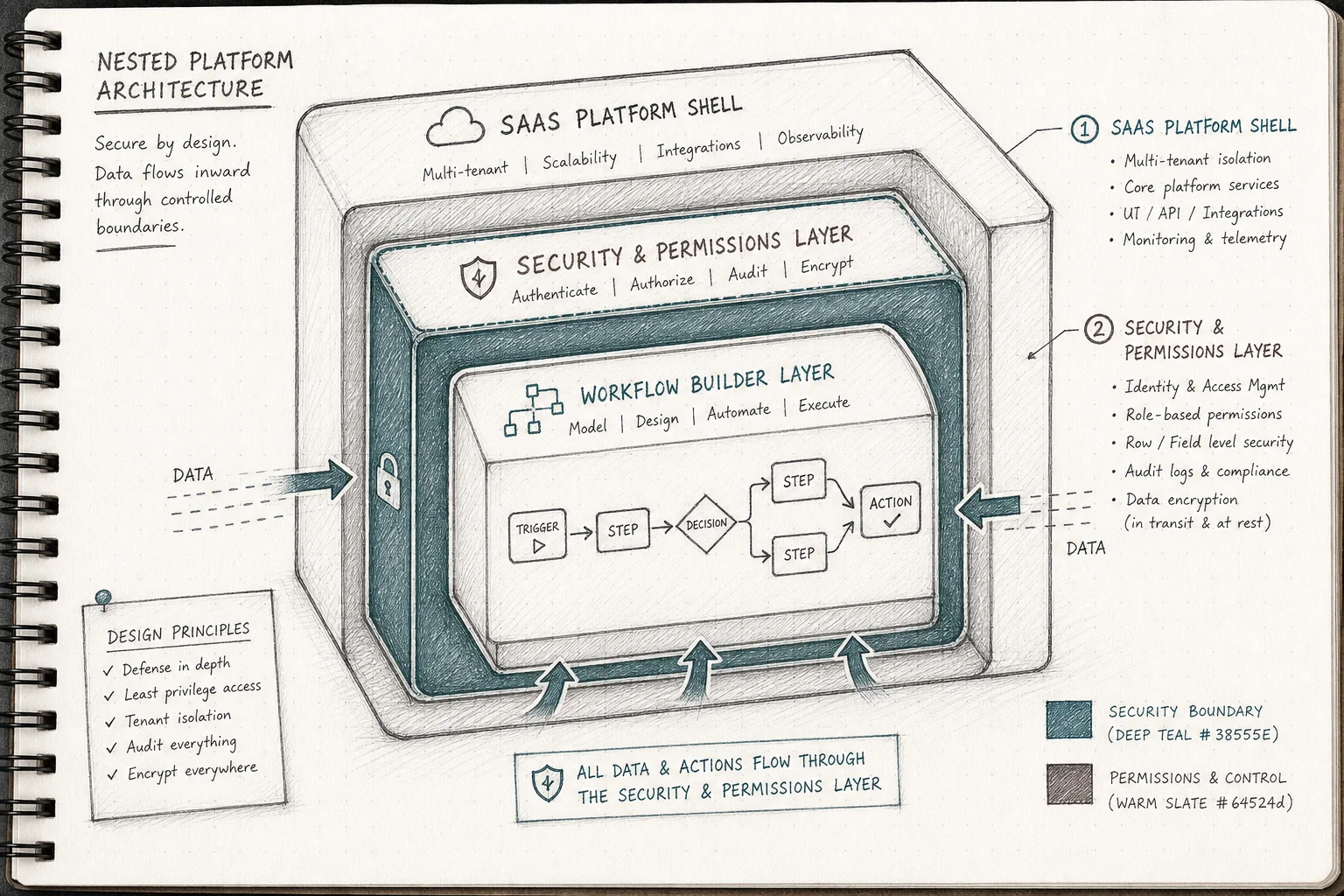
Every workflow a customer builds must pass through your existing security model, your SSO, your role-based access controls, your row-level permissions. Not a copy of it. Not a parallel version of it. The same one, enforced at the infrastructure level.
Here's why this is non-negotiable: if a user can't see certain records in your core product, a workflow they build cannot see those records either. The moment you create a separate security layer for generated workflows, you've created a new attack surface, a new compliance audit item, and a new reason for enterprise security teams to say no.
The right architecture enforces three things:
- Multi-tenant isolation. Every workflow runs in a sandbox scoped to a single customer's tenant. Customer A's workflows cannot read Customer B's data, even on a shared platform instance.
- Permission pass-through. Every API call a generated workflow makes passes through the same authorization rules the rest of your platform already enforces.
- Audit logging. Every generation and deployment event is logged. When an enterprise security team asks "who built this workflow and when did it go live," you have an answer.
This is the single biggest differentiator between an embedded workflow builder and a generic AI coding tool. Tools like Lovable or Bolt produce standalone applications with their own security islands. At one app, that's manageable. At hundreds of workflows across hundreds of customers, it becomes an unmanageable governance problem. Security inheritance isn't a feature, it's the foundation.
4. Seed the Marketplace With First-Party Workflow Templates
Don't launch an empty builder and expect customers to know what to do with it. The activation barrier for a blank canvas is high, even when the tool is genuinely easy to use.
Before you go live, build 5-10 first-party workflow templates that cover the most common use cases across your customer base. These become the starting point for customers who aren't sure where to begin, and they demonstrate what's possible for customers who are.
Good candidates for first-party templates include:
- Approval flows (change orders, purchase requests, compliance sign-offs)
- Onboarding checklists (new user setup, account configuration, first-week tasks)
- Compliance forms (inspection records, audit trails, regulatory checklists)
- Shift-handoff tools (what changed, what's pending, what needs immediate attention)
- Escalation workflows (overdue items, threshold alerts, manager notifications)
Your customer success and solutions engineering teams are the right people to build these. They already know which workflows come up in every onboarding call. Give them access to the builder before GA launch and let them create the templates your customers will actually use.
5. Enable End-Users to Build in Plain English
Once the API surface is connected and security is wired up, the builder itself takes over, and this is where the experience diverges sharply from anything your customers have seen before.
A customer describes what they need in plain English: "Show me which work orders are overdue, grouped by site, with a button to reassign to the nearest available technician." The AI maps that description to the discovered API endpoints, generates the workflow interface, and runs it through automated validation, compile checks, schema validation, permission enforcement, before deployment.
The workflow goes live the same day. Not in the next sprint. Not after a scoping call. The same day.
Customers iterate conversationally from there. "Also highlight anything over 30 days old in red." "Add a field for the technician's notes." Version history means every change is reversible. Nothing is permanent until the customer decides it is.
This is the moment the usage-gap problem starts to close. The workflows customers build aren't generic, they're built around their specific description of their specific job. A hospital's biomedical engineering team builds a "critical equipment down" board organized by patient impact. A roofing company builds a morning prioritization tool based on their own margin logic. A fleet operator builds a shift-handoff tool that incorporates their driver-customer relationship data. None of these would ever make it onto a shared product roadmap. All of them drive daily use.
For teams exploring how AI agents fit into this picture, the same API-first architecture that powers custom dashboards also supports agent-driven workflows, the foundation is identical.
6. Govern Publishing and Distribution
A workflow that only one person can use is a personal tool. A workflow that can be discovered, installed, and adapted by others is a platform asset. The difference is governance.
Once a customer builds a workflow they're happy with, they should be able to publish it, to their own organization, or (with your permission) to other customers facing the same problem. This is how a single good workflow becomes a template that drives adoption across your entire customer base.
The governance layer handles:
- Versioning. Every published workflow has a version history. Changes can be rolled back. Updates can be pushed to all installers or held for review.
- Publishing controls. You decide which workflows can be shared within an organization, which can be shared across organizations, and which require your review before going live.
- Usage analytics. You can see which workflows are actively used versus abandoned. This data feeds directly into your product roadmap, the workflows with the highest adoption across customers are the ones worth considering for native features.
The support impact is measurable. Production deployments consistently report reductions in "how do I..." and feature-request tickets in the 30-35% range, because customers solve their own problems instead of waiting on your support queue.
What This Unlocks for Your Business
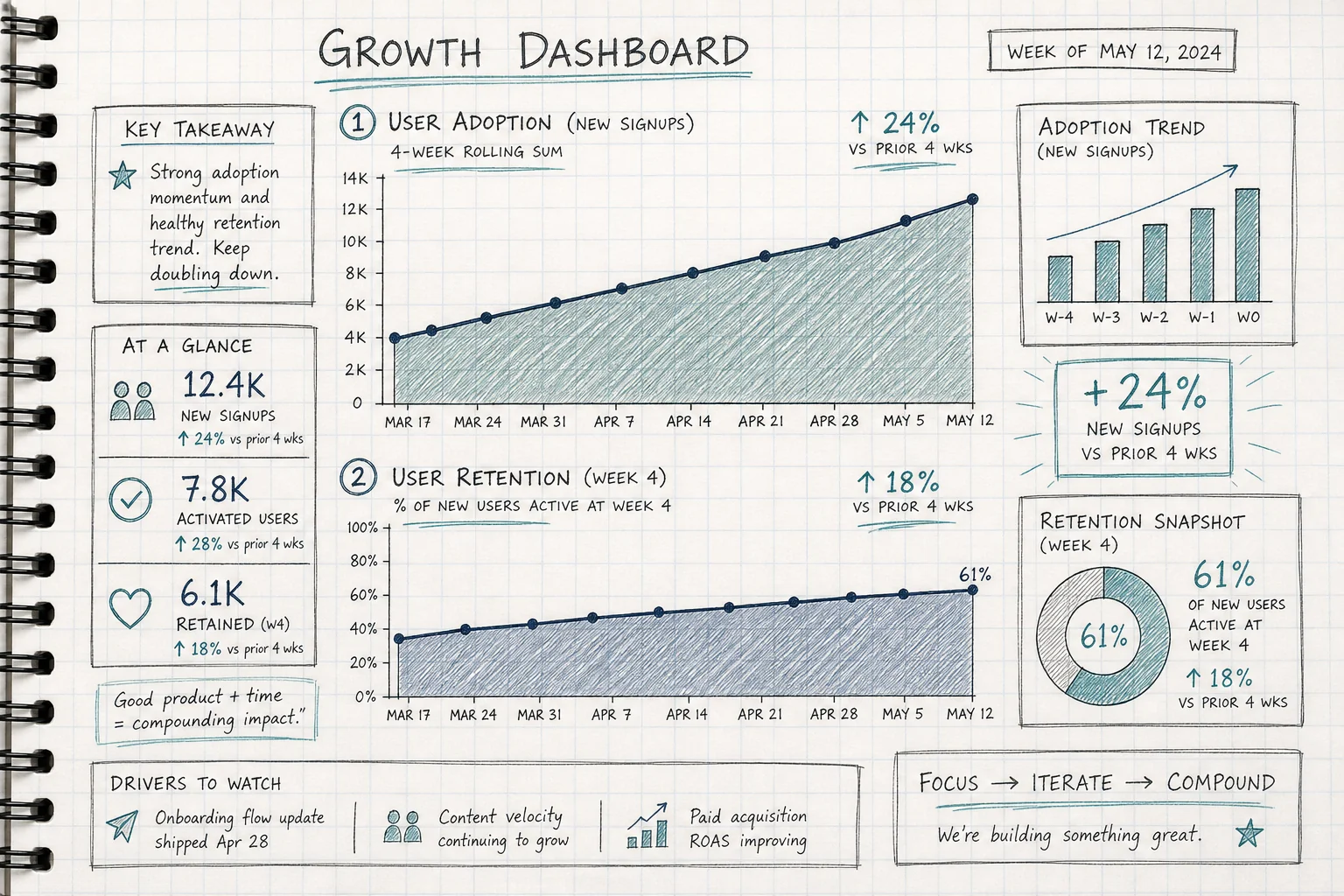
The metrics from production deployments of embedded workflow builders tell a consistent story, and they're worth understanding before you decide whether this investment makes sense.
Adoption jumps dramatically. Roughly 90% of users activate at least one custom workflow, compared with a typical 20-40% adoption rate for a standard feature release. The reason is simple: a workflow built around your specific job is more useful than a generic feature built for the average customer.
Retention follows adoption. Day-30 retention among users who built or used a custom workflow runs in the 85-90% range, well above the industry-average one-month retention figures commonly cited around 35-40%. Customers who shape the product around their workflow don't leave, because leaving means losing the tools they built.
Net revenue retention improves. Accounts that build custom workflows expand to higher tiers to support more users and more data. The extensibility itself becomes a reason to grow within your platform rather than look elsewhere.
Sales cycles shorten. When a solutions engineer can build a requested workflow live during a sales call, rather than promising it "on the roadmap", win rates improve meaningfully. The prospect sees their specific workflow running on their actual data before they sign. That's a different conversation than a demo of generic features.
Engineering capacity returns. Industry estimates put the share of engineering capacity consumed by one-off, single-customer requests as high as 30-40% at mid-market B2B SaaS companies. An embedded workflow builder routes those requests to the customers themselves, freeing your team to work on the core product innovations that benefit everyone.
This is what it means to evolve from a product into a platform, not by building more features, but by giving customers the tools to build the last mile themselves.
Frequently Asked Questions
How long does integration take?
Most teams complete the core integration, API connection, security mapping, design system configuration, and first-party template seeding, in roughly two weeks. The timeline depends primarily on the completeness of your OpenAPI spec and the complexity of your permission model.
Do my customers need to know how to code?
No. The builder accepts plain-English descriptions and generates the workflow automatically. The target user is a customer success manager, an ops lead, or a power user, not a developer. That said, solutions engineers and implementation specialists often build the first wave of workflows alongside customers during onboarding.
What happens to security when a customer builds a workflow?
Every workflow inherits your platform's existing authentication, role-based access controls, and row-level permissions. A user building a workflow cannot access data they couldn't already access in your core product. Every generation and deployment event is logged for audit purposes.
Can I control which workflows get published to other customers?
Yes. Publishing controls are configurable at the platform level. You can restrict sharing to within a single organization, require your review before cross-customer publishing, or open a governed marketplace where customers can discover and install each other's workflows. The governance model is yours to define.
How is this different from just adding a chatbot or AI copilot?
A chatbot answer disappears when the session ends. A workflow built with an embedded builder is a durable, installable application that becomes part of a customer's daily toolkit. The output is persistent, versioned, and specific to that customer's workflow, not a one-size-fits-all response generated fresh each time. That's the difference between AI that adds novelty and AI that drives retention.
The enterprise deal that stalls over a custom approval flow doesn't have to be a negotiation. With an embedded workflow builder wired into your platform, your solutions engineer can build that flow live, on the prospect's data, inside your product, before the call ends. That's not a roadmap promise. That's a closed deal.
If you're ready to see what this looks like inside your specific platform, book a demo with the Vezel team, we'll walk through your API surface, your customer use cases, and what a two-week integration would actually look like for your product. Or if you'd prefer to explore at your own pace, start a free trial and see how quickly your first workflow goes live. Either way, the backlog item that's been sitting on your roadmap for six months doesn't have to wait any longer.



