


The real cost of one-off SaaS customization is the build quote plus every year of testing, support and upgrades that follows it. Maintenance alone commonly takes 40% to 80% of a system's lifetime cost, so a build that looks like a one-time expense usually behaves like a subscription you pay yourself.
This guide is for CTOs, VPs of Product and engineering leads at mid-market and enterprise B2B SaaS companies in the United States and other English-speaking markets. You will get a cost model you can fill in with your own numbers, then a side-by-side comparison against self-serve extensibility.
At Vezel, we build the extension layer that lets customers create dashboards, workflows and reports inside your product, so the comparison comes from a real alternative, not a thought experiment.
1. Start With the Sticker Price, Then Distrust It
When a large customer asks for a custom approval flow or report, the first number in the room is an engineering estimate. It covers design and coding. It almost never covers what happens in month seven, when the customer's admin changes a process and your release breaks the build.
A US government guide on de-risking technology projects makes the same point about customized off-the-shelf products: the costs to change the code can exceed the base price of the product itself. A one-off build is that situation in miniature. You own every line, so you also own every change.
Needs also move after launch. A Purdue paper on packaged application systems notes that changing business objectives keep creating demand for changes after go-live, and that those changes plus annual upkeep add up to the total cost. Your customer's process will not stay still, so the custom build will not either.
Why the quote understates the bill
Three things hide inside a one-off build. First, the estimate covers effort to develop, not the support and hosting around it. The Carnegie Mellon Software Engineering Institute says plainly that its estimating guidance focuses on development effort, and that items supporting a software system are not counted in those estimates.
Second, the work is single-customer, so nobody amortizes it. Third, it is rarely retired. Nobody wants to tell a big account that its custom report is going away, so the code stays and the cost keeps landing on your roadmap.
2. List Every Cost Line in a Fully Loaded Model
A fully loaded model counts every hour and dollar the custom build touches over its life, not just the first sprint. Use the table below as a checklist. If a line is empty in your current estimate, that is where the surprise is hiding.
| Cost line | When it hits | What to count |
|---|---|---|
| Design and scoping | One-time | Product manager and designer time, customer workshops |
| Build | One-time | Engineering weeks multiplied by your loaded weekly cost |
| Testing and security review | One-time, then each release | QA hours, permission checks, regression suite additions |
| Deployment and hosting | Recurring | Environments, feature flags, customer-specific config |
| Maintenance and enhancements | Recurring, usually rising | Fixes, small changes the customer asks for, dependency updates |
| Support | Recurring | Tickets, escalations, training the support team on a one-customer feature |
| Upgrade exposure | Each major release | Retesting and rework when core code or APIs change |
| Opportunity cost | Throughout | Core roadmap work that did not ship while the team was busy |
| Retirement | End of life | Migration, customer communication, code removal |
Opportunity cost is the line leaders skip most often, and it is the hardest to see on an invoice. Every engineer-week spent on a single customer's workflow is a week not spent on security, reliability or a feature that every account uses. Our post on signs your SaaS company is losing engineering time to one-off requests covers how to spot it.
How big is the maintenance line?
Published estimates vary, but they cluster. Software engineering literature often puts maintenance at 40% to 80% of total lifetime cost, with about 60% as the usual average, and a common planning rule is 15% to 25% of the original build cost every year the software is in use. Roughly 60% of that maintenance is enhancements, not bug fixes.
That last detail matters for customization. Enhancements are exactly what an enterprise customer keeps requesting once the first version lands. Treat your own maintenance history as the better input, and use these ranges only when you have no data yet.
3. How Do You Calculate the Fully Loaded Cost Step by Step?
Add the one-time build cost to the yearly cost of maintenance, support and upgrade rework, multiplied by the years you expect to keep the feature. Then add the opportunity cost of the engineering time used. Run the sum over three to five years, because year-one numbers always flatter a custom build.

Here is the sequence, with the inputs to gather from your own systems.
- Price the build. Take engineering weeks (including design, QA and release) and multiply by your loaded weekly cost per engineer. Pull weeks from past one-off projects, not from the new estimate.
- Set the yearly maintenance rate. Use your own ticket history for similar custom work. With no history, start with the 15% to 25% of build cost per year rule of thumb and mark it as an assumption.
- Add support. Count tickets and escalations per quarter on the custom feature, times average handling hours, times support cost per hour.
- Add upgrade rework. For each major release, estimate regression testing and fixes for this build. Multiply by releases per year.
- Add opportunity cost. Take the engineer-weeks used in steps 1 to 4 and ask what core item would have shipped with them. Put a value on that, even a rough one.
- Multiply across the horizon. Use three years as the minimum and five if the customer is a strategic account.
A hypothetical worked example
These numbers are invented to show the arithmetic, not taken from any real engagement. Suppose a custom approval workflow takes 6 engineer-weeks at an assumed $4,000 loaded weekly cost. That is a $24,000 sticker price.
Now assume 20% of build cost per year for maintenance ($4,800), $3,000 a year for support, and $2,500 a year for upgrade rework. That is $10,300 a year in recurring cost. Over three years, the total is $24,000 plus $30,900, or $54,900, before any opportunity cost.
The sticker price covered less than half the three-year bill. Swap in your own weeks, rates and ticket counts, and the shape usually holds: the longer you keep the build, the smaller the build quote looks.
4. What Does the Self-Serve Extensibility Alternative Cost?
The cost of self-serve extensibility is a platform fee, a short integration project and some governance time, instead of engineering weeks per customer request. Vezel does not publish a fixed price, so request a quote based on your product. Integration for most SaaS platforms takes a few days.
The cost lines move rather than disappear. You still pay for a platform and you still govern what gets published. The difference is that each new customer request no longer starts a new build project on your team.
The cost lines to model
- Platform fee. Ask the vendor for a written quote and what drives it. Do not guess from other tools.
- Integration. Vezel connects to your product's APIs and data models with a zero-footprint setup. Most SaaS platforms can integrate it in a few days, and engineering time here is a one-time line.
- Governance setup. Publishing, permissions, approvals and the extension lifecycle run from a central control plane. In our experience, setting up the control plane review queue usually takes about 7 days.
- Admin and review time. Someone on your side reviews what gets published. Count their hours per week.
- Support. Extensions inherit your existing authentication, permissions and access controls, which keeps the permission model your support team already knows.
Customers describe what they need in plain English, and the extension runs inside your product with a native, white-labeled look. The team that wants the capability creates it, so the build cost shifts away from your engineers. That shift is the whole economic argument. For the mechanics, see our guide to giving SaaS customers self-serve customization.
5. Side-by-Side Framework: One-Off Build vs Self-Serve Extension
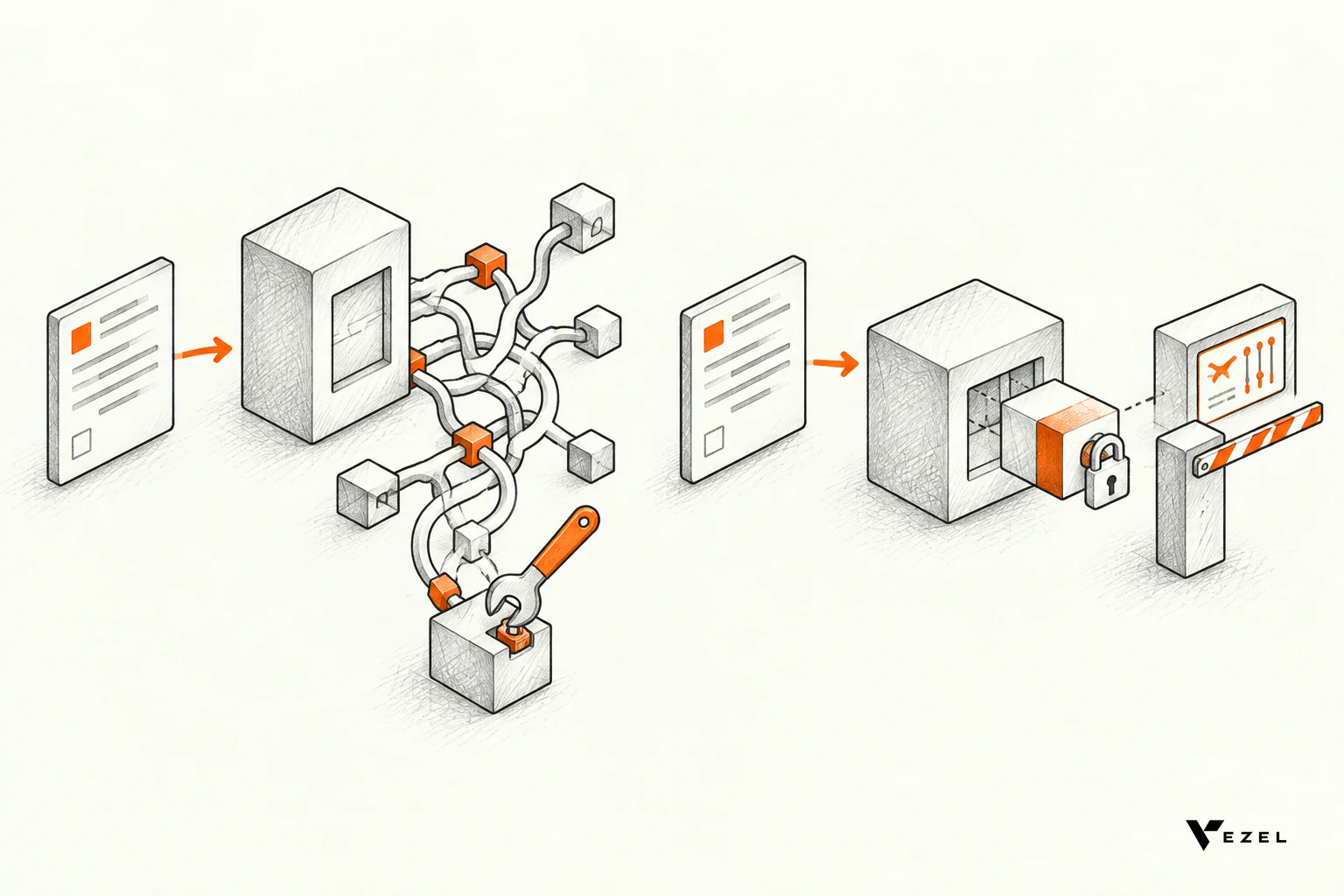
Compare the two paths on the same attributes, not just on price. The table below is a scoring sheet. Fill in the right-hand column from your own pilot or estimate, and the pattern should show where each option wins.
| Attribute | One-off custom build | Self-serve extension |
|---|---|---|
| Who builds it | Your engineers | Customer admins, your team or end users, in plain English |
| Where it lives | In or beside your core code | Inside your product as an extension, in a secure container |
| Delivery path | Prioritize, design, build, test, release | Describe, generate, review, publish |
| Maintenance owner | Your engineering team, indefinitely | Governed through the control plane, with the extension lifecycle managed there |
| Upgrade exposure | Retest every release | Built against your APIs and data models, so changes are checked at the interface |
| Reuse | Usually one customer | Can be refined and shared with other customers |
| Evidence for roadmap | None until after the build | Usage and feedback show what deserves promotion into the core |
| Best for | Core, broadly needed or deeply sensitive logic | Dashboards, reports, forms, approval flows and department tools |
When the one-off build still wins
Not every request belongs in an extension. If many accounts need the capability, or it touches core data integrity, build it into the product properly. Extensions suit the long tail: needs valuable to one team or customer but too narrow for the shared roadmap.
A simple rule works well. If the request is broad, build in core. If it is specific and uses data you already expose, make it an extension. If you cannot tell, make it an extension first and let usage decide. This is the build, learn, evolve model: an extension that proves broadly valuable can be promoted later.
Do the math on teams, not just dollars
Cost is only one side. Engineering leaders in the US often feel the effect first in capacity: sales promises a workflow, a quarter passes, and the platform work slips. If you compare against external tools too, our breakdown of Retool versus embedded extensibility shows how the ownership questions differ.
6. Measure the Difference With a Focused Pilot
Do not take our word, or a spreadsheet's, for the savings. Run a pilot on one high-value use case and measure it against your current process. Pick a request that is already in your backlog, so you have a real baseline and a real customer waiting.
- Choose one use case. A custom dashboard, an approval flow or an inspection form works well. Avoid anything that rewrites core logic.
- Record the baseline. Capture how long the same request took last time, engineer-hours used, and support tickets in the first 90 days.
- Run the extension path. Build the same capability as an extension with a customer admin or your own team.
- Compare four numbers. Time to delivery, engineering hours, adoption (who uses it and how often), and support load.
- Decide per capability. Keep it as an extension, share it, or promote it to the core based on the usage you saw.
Governance is part of the pilot, not an afterthought. Check that the extension respects your permissions, that the review queue works for your team, and that you can retire the extension cleanly. That last test is exactly what one-off builds usually fail.
If you want to see this on your own product, book a demo and bring one real customer request. We respond to inquiries within 1 to 2 business days. You can also read how Vezel works step by step first: connect your APIs, generate extensions from plain English, run them in a secure container, then scale and govern.
Whichever way you decide, put the fully loaded number next to the sticker price before you say yes to the next custom build. The gap between the two is where your roadmap goes.