Superblocks wins when your own engineers need an internal admin panel fast. Vezel wins when you need to hand extension-building directly to your paying customers, inheriting their permissions and wearing your brand. That's the real superblocks vs vezel for customer facing extensibility split: builder audience, not feature count.
Key Takeaways
- Different audiences, different architecture: Superblocks is built for internal engineering teams building admin apps; Vezel is built to sit inside your product for end customers.
- Permission inheritance is the dividing line: Vezel extensions run inside your product's existing auth and RBAC; a Superblocks app needs its own access setup layered on top.
- API auto-discovery changes time-to-first-extension: Vezel maps existing OpenAPI endpoints automatically, where Superblocks apps are built connector-by-connector by a developer.
- Governance means a marketplace, not just an open API: a governed model versions, publishes, and controls what customers can see and ship, not just whether they can call an endpoint.
- White-labeling decides whether it feels native: customer-facing extensions need to look like your product, not a separate embedded app shell.
At a Glance: Superblocks vs Vezel
| Dimension | Superblocks | Vezel |
|---|---|---|
| Primary user | Internal engineering teams | End customers, non-technical |
| Deployment model | Separate app, own auth layer | Embedded inside host product session |
| Permission model | Configured per app | Inherits host RBAC and row-level access |
| API connection | Manual connector setup by developer | Auto-discovery from existing APIs/data models |
| Branding | Superblocks or custom-coded shell | White-labeled to match host design system |
| Governance | IT/security policy controls in AWS private cloud | In-product governed marketplace with versioning |
| Who builds | Developers, using drag-and-drop plus code | Customers, using plain English prompts |

Superblocks vs vezel for customer facing extensibility: what each platform is actually built for
Superblocks describes itself as a way to help teams "deliver internal apps fast, without the grunt work", letting business teams build production apps while IT and security retain control of integrations and permissions. That framing matters: the product is built around internal teams and developers, connecting to databases and APIs to build admin tools.
Vezel starts from a different premise. Instead of a separate app your engineers build for internal use, it's an embedded layer that lives inside the SaaS product your customers already log into. The extension a customer builds isn't a new destination. It's a screen inside the product they already use every day.
That distinction isn't cosmetic. It decides who does the building, where the extension runs, and whose login controls what it can see. If you're evaluating either platform, start by asking who's supposed to type the first prompt: your developer, or your customer's ops manager. The rest of the architecture follows from that answer.
How permission inheritance works in each platform
Superblocks lets Security and IT teams retain control over data connections, permissions, secrets, auditing, deployment, and source review while business teams build apps in a private cloud. That's a strong model for internal governance, built around your own team's AWS environment.
Vezel takes a different path for the same problem. An extension a customer builds inherits the host product's existing authentication and access controls automatically. A user who can only see their own accounts inside your product sees the same restricted slice inside any extension they build, without a parallel permission system to configure and audit separately.
For a customer-facing use case, that difference decides whether your security team signs off in a week or spends a quarter mapping a second access model. Read our deeper walkthrough on internal tool builders vs customer-facing extensibility if this is the part your buyer's security review will focus on.
API auto-discovery: manual wiring vs native mapping
Superblocks connects to your databases and APIs, and its platform emphasizes drag-and-drop components plus custom code for extending further. But someone still has to build the connector, choose the components, and wire the screen. That's developer time, every time a customer needs something new.
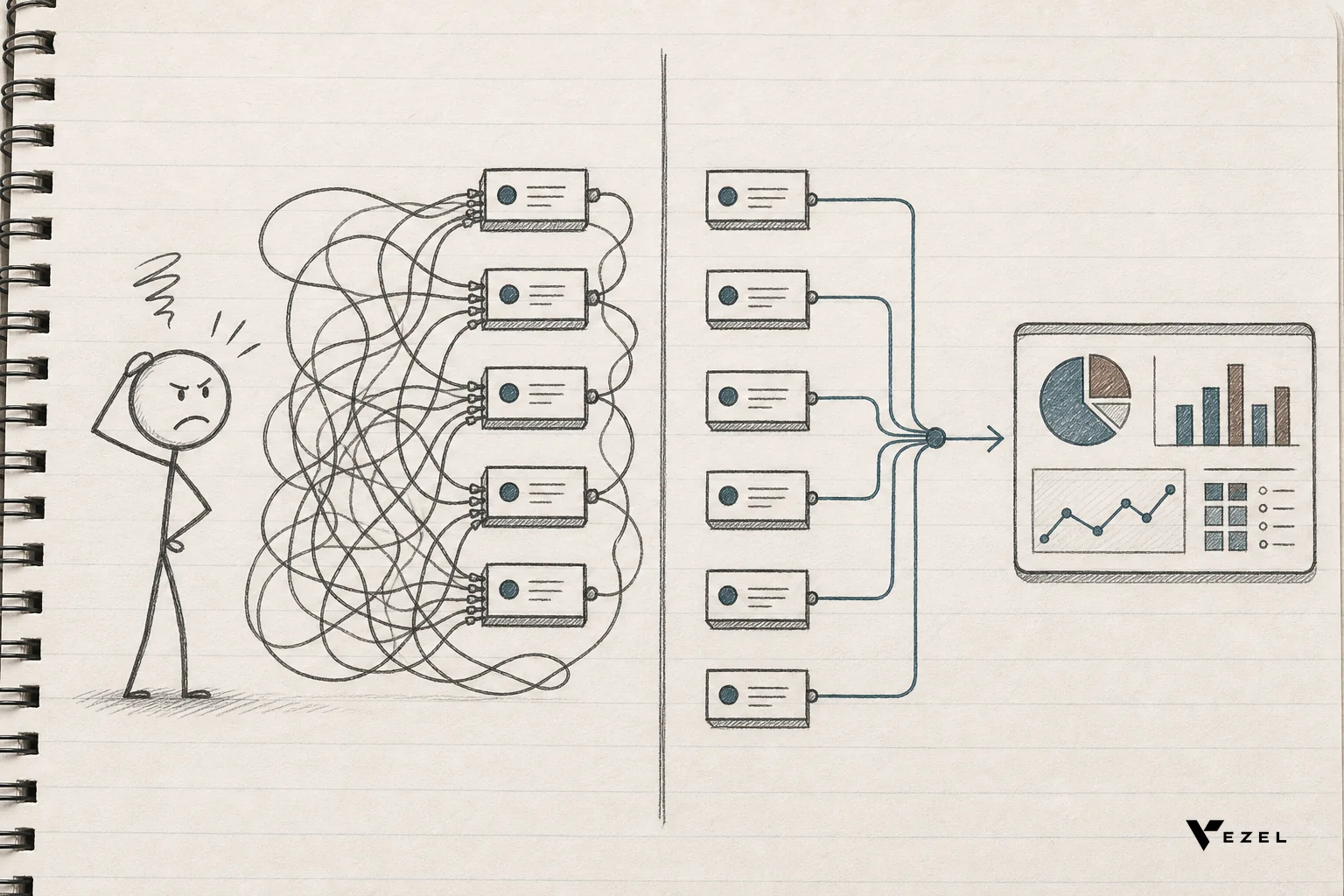
Vezel's auto-discovery reads your existing OpenAPI-based endpoints and maps them to your product's data model before a customer even opens a prompt box. When a customer asks for a supplier scorecard or a KPI rollup in plain English, the platform already knows which endpoints hold that data. There's no ticket routed to engineering to expose a new connector first.
This is the practical difference between "our API is technically open" and "our extensibility model actually works for a non-technical customer." One requires a developer as translator. The other doesn't. If you want the step-by-step version of this, our guide on connecting SaaS to customer workflows without code walks through it.
Is a platform's extensibility model actually governed, or just technically open?
A model is actually governed when it controls who can publish an extension, tracks versions over time, and lets you revoke or roll back access, not just whether an API call succeeds. Technical openness alone answers "can this connect," not "can we manage what customers ship."
Superblocks addresses this for internal teams through IT and security policy agents inside a private cloud, guaranteeing every action passes through auditing and access review. That's real governance, aimed at engineering and IT admins.
For a customer-facing scenario, governance needs a different shape: a marketplace where a product owner can see every extension a customer built, version it, deprecate it when an underlying field changes, and control what gets published without a security incident. That's the layer a pure API connection doesn't give you on its own.
Marketplace governance and white-labeling
An internal tool built in Superblocks is designed to be used by your own team, inside your own environment. Handing that same builder to an external customer means solving branding, hosting, and access boundaries yourself, on top of the build.
Vezel ships a governed in-product marketplace by default. Extensions a customer builds get versioned, published, and discovered inside the same white-labeled shell as the rest of your product. Nothing looks bolted on. A customer opening their dashboard sees your logo, your color scheme, your navigation, not a separate embedded tool with its own visual language.
That marketplace layer is also where lifecycle management happens: what happens when you change an API field six months after a customer built an extension on top of it. Our lifecycle management guide for customer-built SaaS extensions covers exactly that scenario.
Which one fits your team: a decision checklist
Choose Superblocks when the requester is an engineer, the app stays inside your own walls, and the goal is an admin panel or ops dashboard your team uses this quarter. Its private-cloud model and drag-and-drop components fit that job well.
Choose Vezel when the requester is a paying customer, the extension needs to live inside your product's branding, and you need it to inherit permissions automatically instead of building a second access model. If your sales team keeps hearing "can you build this custom dashboard for us" from enterprise prospects, that's the signal.
- Red flag for Superblocks in a customer-facing role: if every new customer extension needs a developer to configure a new connector, you haven't removed the roadmap bottleneck, you've just renamed it.
- Red flag for any embedded platform: if it can't show you a version history and a rollback path for what a customer built, that's technically open, not governed.
- Green flag either way: the platform can demonstrate a real permission boundary in a live session, not just describe one in a sales deck.
For a broader rundown of what to check across any embedded platform you evaluate, see how to choose an embedded extensibility platform.
FAQ: Superblocks vs Vezel for customer facing extensibility
Is Vezel a Superblocks alternative?
Vezel is an alternative when your goal is customer-facing extensibility rather than internal tooling. Superblocks targets engineering teams building internal apps; Vezel targets SaaS vendors giving end customers self-serve, white-labeled extension building inside the product itself.
Can Superblocks be used for customer-facing extensions?
Superblocks is built around internal apps for business and engineering teams, with IT and security controlling permissions inside a private cloud. Extending that to external, non-technical customers means building your own branding, hosting, and access layer on top rather than getting it by default.
Does Vezel replace engineering entirely?
No. Vezel removes the one-off custom-build tickets for customer-specific dashboards, workflows, and reports, freeing engineering for the core roadmap instead of bespoke requests. Engineering still owns the core product and the APIs Vezel connects to.
If your team is fielding another round of "can you build us a custom dashboard" from an enterprise prospect this quarter, that's the moment to stop routing it through a sprint. Book a demo and watch a real extension get built live, inheriting your product's own permissions, or see how it works before you bring it to your next security review.