An AI extension builder is embedded software that lets your customers describe a dashboard, workflow, report, or agent in plain English and get a working, permissioned feature inside your product, not a separate app. It runs under your brand, connects to your existing APIs, and inherits your login and access rules automatically.
Key Takeaways
- It lives inside your product: unlike a standalone builder, an embedded AI extension builder ships as part of your SaaS, under your domain and design system.
- Prompting replaces tickets: customers type a plain-English request and get a live dashboard or workflow connected to their real data, not a mockup.
- Security is inherited, not rebuilt: extensions reuse your existing authentication and row-level permissions instead of a second login system.
- Governance has to come first: a control plane for publishing and versioning extensions is what separates a scalable rollout from shadow IT.
- Backlog pressure is real: teams commonly lose around 40% of engineering capacity to one-off customer requests, which is the pressure this category exists to relieve.
At a Glance: Embedded AI Extension Builders
| Attribute | Embedded AI extension builder | Generic no-code tool |
|---|---|---|
| Where it lives | Inside your product, white-labeled | Separate standalone app |
| Who builds | Your end customers | Your internal team, usually developers |
| Login | Inherits your existing auth | New login and user directory |
| Data access | Connects via API auto-discovery to your data model | Manual connectors, often duplicated data |
| Permissions | Row-level, inherited from your platform | Rebuilt from scratch per app |
| Output type | Dashboards, workflows, reports, forms, agents | Standalone apps or internal tools |
| Governance | Versioning and publishing control plane | Usually none, or bolted on later |
What Is an AI Extension Builder?
Picture a customer success manager who wants a renewal-risk dashboard filtered by account tier. Instead of filing a ticket, she types a sentence describing what she wants. The extension appears inside the product she already logs into, built from her company's own data.
That's the core idea. An AI extension builder is not a chatbot bolted onto your app. It's a generation layer that reads your product's data model and design system, then turns a plain-English request into a real, working piece of software: a dashboard, an approval workflow, a report, a form, or even a support agent.
The word "embedded" matters. The extension doesn't open in a new tab or a separate account. It looks and behaves like a native part of your SaaS, because it is one, built on the fly. For product leaders evaluating adaptive SaaS platforms, this is the distinction to hold onto: adaptation happens inside the product customers already use every day.
How Plain-English Prompting Actually Generates a Dashboard or Workflow
Prompting works because the builder already knows your API surface. It reads your OpenAPI schema or endpoint structure ahead of time, mapping entities like accounts, tickets, or invoices before any customer ever types a request.
When a customer describes a "weekly churn-risk dashboard grouped by industry," the builder matches that language to real fields in your data model. It generates a UI, wires it to live data, and themes it to match your product automatically, rather than handing back a generic template.
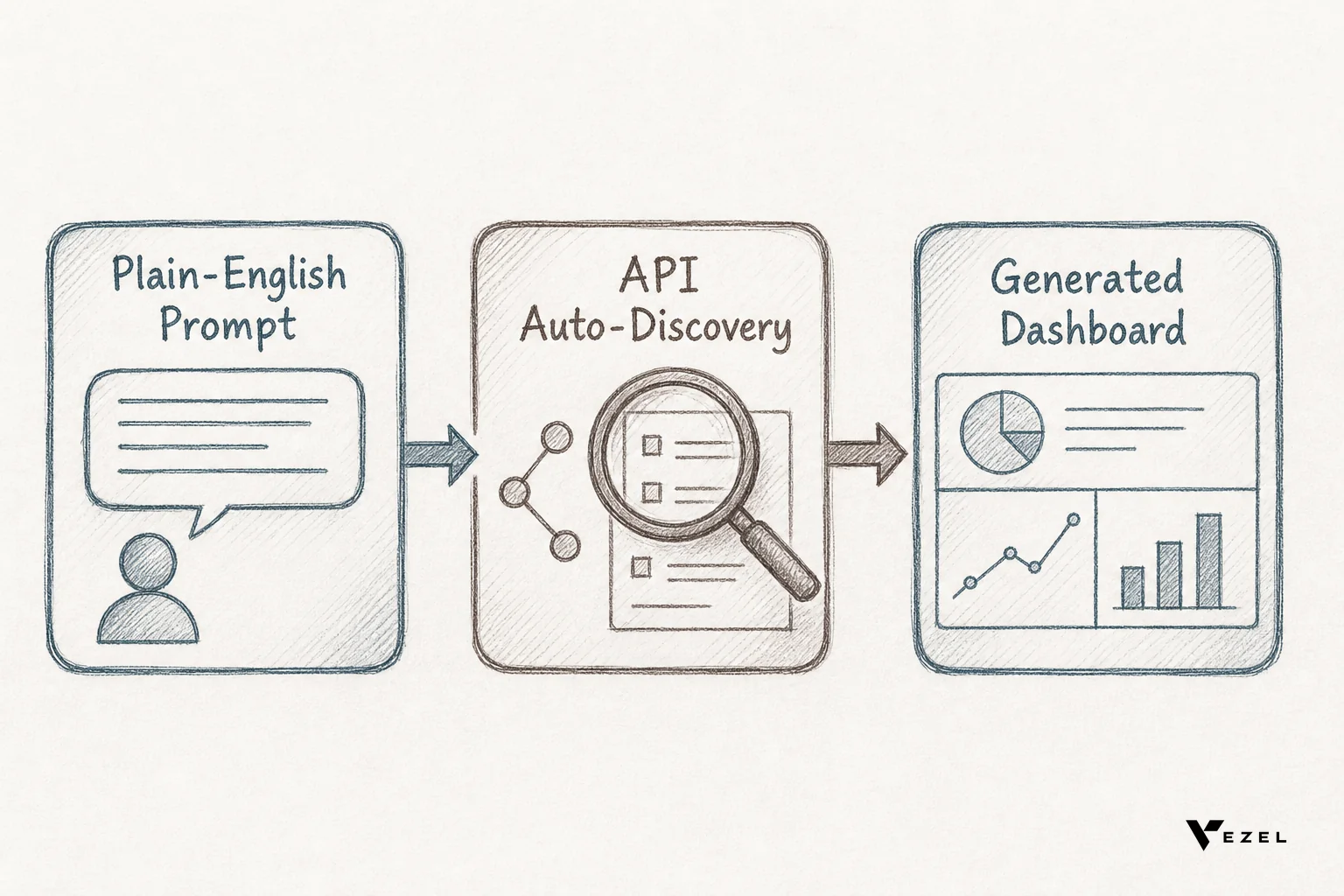
Workflows follow the same path. A request like "route expense approvals over $5,000 to a finance manager" becomes a working approval chain, respecting whatever role hierarchy already exists in the host product. Nobody hand-codes the routing logic. If you want the mechanics in more depth, this is covered step by step in how to embed a workflow builder in your SaaS.
How Is This Different from Bolting On a Generic No-Code Tool?
A generic no-code tool solves a different problem than an embedded extension builder does. It is not simply "less integrated" — it was designed for a different job and a different user, and the gap shows up in every deployment decision.
Retool is built as a standalone platform for engineering teams building internal admin tools that connect to real business data, distinct from a customer-facing extension layer inside a product. Glide is a general-purpose AI app builder that turns spreadsheets or plain-language descriptions into standalone apps, rather than extensions native to an existing SaaS product's data model.
Superblocks is built for internal engineering teams to develop and govern production-grade internal applications, not for handing extension-building directly to end customers. Mendix positions itself as a full-stack, low-code enterprise application platform for building and orchestrating agents and apps, a different scope than a lightweight layer purpose-built to embed inside one existing product.

None of these are bad tools. They were simply built to solve a different problem: giving your own engineers a faster way to build internal apps, not giving your paying customers a self-serve way to extend the product they already use. For a side-by-side breakdown, see Retool vs embedded extensibility for SaaS products and Glide vs embedded extensibility.
1. Map Your Extension Use Cases
Start by pulling your last quarter of customer feature requests. Sort them into dashboards, workflows, reports, forms, and agents. This becomes your priority list for what to pilot first.
Most teams find that a handful of request types repeat across dozens of accounts. Those are the ones worth generating extensions for immediately, since fixing them once removes the whole category from your backlog.
2. Connect Your APIs and Data Models
The builder needs to see your existing endpoints before customers can prompt anything useful. This is typically a one-time setup where the platform auto-discovers your data model through your existing API documentation.
Read more on the mechanics in how to connect AI extensions to your SaaS APIs. Good API hygiene here pays off across every extension your customers build later.
3. Set Up Governance Before You Launch
Governance is not optional polish, it's the difference between controlled extensibility and shadow IT with better branding. Every extension a customer builds should inherit row-level permissions and pass through a publishing step before it goes live for a team.

This means defining who can publish, who can edit, and how versions roll back if something breaks. Teams skipping this step tend to end up right back where they started: unmanaged, unaudited customizations nobody fully understands. See how to set up an AI onboarding agent in your SaaS for a related governance walkthrough.
4. Pilot with a Small Group of Customers
Pick three to five power-user accounts, ideally ones already filing custom requests, and give them early access. Watch what they build, not just what they ask for.
This pilot phase tells you which prompt patterns need refinement and which permission edge cases you missed. It's far cheaper to learn this with five accounts than with five hundred.
Common Beginner Mistakes to Avoid
Teams new to this category tend to repeat the same handful of errors. Treating the extension builder as a generic app-building sandbox, rather than a layer purpose-built for your product's data and permissions, is the most common one.
- Skipping the governance layer because the pilot group is small and "trusted"
- Leaving the builder unbranded, so it feels like a bolted-on third-party tool
- Not mapping API endpoints thoroughly before opening prompting to customers
- Rolling out to every customer at once instead of piloting first
A deeper list of pitfalls lives in 5 common mistakes rolling out a no-code extension builder to customers.
Is an AI Extension Builder Right for Your SaaS?
It's the right fit if your engineering team is fielding recurring, customer-specific dashboard or workflow requests, and enterprise deals keep stalling on "can you build us a custom X." If your backlog is mostly market-wide feature requests instead, a roadmap fix, not an extensibility platform, is the better next step.
Vertical SaaS platforms, particularly in HR tech and healthcare, tend to see this pressure earliest, since every customer's compliance and reporting needs differ by regulation and region across the United States market. If that description matches what your team is dealing with this quarter, it's worth seeing the mechanics firsthand rather than reading about them secondhand.
You can see how it works with a real product walkthrough, or go straight to booking a demo to map your own backlog against what an embedded extension builder could take off it.